Designed to scale with your workplace.
Viewteam is the workplace management platform for hybrid organisations that want complete flexibility. Quick to deploy and easy to use, with no setup fees, hidden charges or long-term contracts.
Essentials
All the everyday features to help make your hybrid workplace run smoother.
£1.50 / per user per month
(excludes VAT)
-
Desk, room and parking space booking
-
Unlimited users, spaces, locations and floor plans
-
Microsoft Teams app integration
-
Book for colleagues and visitors
-
Allocate assigned desks and spaces to users
-
User tags for roles and responsibilities
-
Booking check in and auto release
-
Workplace utilisation analytics dashboard
-
Single Sign-On (SSO) via Microsoft
Enterprise
Advanced workplace management, with enterprise functionality built in.
£2.50 / per user per month
(excludes VAT)
-
Everything in Essentials
-
User provisioning (SCIM)
-
Calendar integration (Outlook)
-
Add bookings to calendar
-
Space photos
Find the plan that’s right for you.
Essentials
Enterprise
Essentials
Enterprise
Core platform
Essentials
Enterprise
Hybrid workplace management
Manage desks, meeting rooms, parking and workplace attendance from one simple platform.
Web browser
Access Viewteam securely from any modern web browser, including mobile devices.
MS Teams app
Book, manage and view workspace availability directly from Microsoft Teams.
Unlimited users
Add as many employees as you need without user-based limits.
Unlimited
Unlimited
Unlimited desks
Create and manage unlimited bookable desks across your office locations.
Unlimited
Unlimited
Unlimited meeting rooms
Create and manage unlimited bookable meeting rooms across your locations.
Unlimited
Unlimited
Unlimited parking spaces
Create and manage unlimited bookable parking spaces for employees and visitors.
Unlimited
Unlimited
Unlimited locations
Manage multiple offices, floors and locations from one Viewteam account.
Unlimited
Unlimited
Unlimited admins
Add multiple administrators to help manage locations, users, bookings and settings.
Unlimited
Unlimited
Set-up fees
No hidden charges. Start using Viewteam without additional implementation or set-up charges.
None
None
Monthly flexibility – cancel anytime
Use Viewteam on a flexible monthly basis with the peace of mind you can cancel at any time.
No annual commitment
Avoid being locked into a long annual contract. Business moves too fast for that.
Scale up or down at any time
Adjust your Viewteam usage as your workplace needs change.
Desk & space booking
Desk booking
Let employees reserve available desks quickly and easily before coming into the office.
Parking space booking
Allow employees to reserve parking spaces alongside desks and rooms.
Custom booking space types
Create additional bookable space types such as call booths, breakout areas or collaboration spaces.
Book for colleagues
Make desk and room bookings on behalf of colleagues.
Book for guests
Reserve desks, parking spaces or rooms for guests and visitors before they arrive.
Favourite workspaces
Save preferred locations and floor plans for faster repeat booking.
Space availability
See available desks, rooms and spaces before making a booking.
Prevent double bookings
Prevent more than one person from booking the same space at the same time.
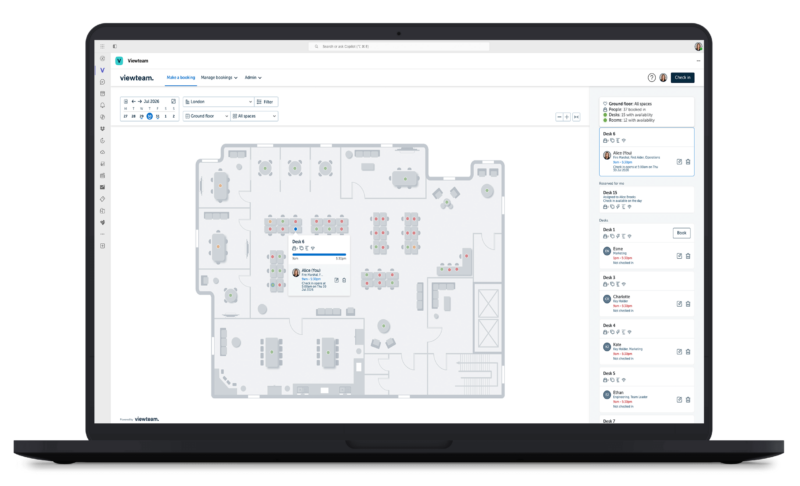
Interactive seating plans / office maps
View office layouts and book spaces directly from interactive floor plans.
Location photos
Show photos of locations to help users recognise the right office or floor.
Space photos
Show photos of individual spaces so users know what they are booking.
Workspace amenities
Display available amenities and equipment for each workspace.
View and filter by space equipment / resources
Filter available spaces by type, equipment, amenities or resources.
View and manage upcoming bookings
Let users review, amend or cancel their upcoming bookings.
Department & team zones / neighbourhoods
Create group spaces by department, team zone or neighbourhood.
Permanently assigned spaces
Assign selected desks, rooms or spaces permanently to specific users.
Allocated & reserved seating
Restrict selected spaces so only specific users or groups can book them.
Hot desking
Support flexible working by allowing employees to share desks rather than having fixed seating.
Add booking to calendar (Outlook)
Users can add space bookings to their Microsoft Outlook calendar.
Check-in
Ask users to confirm attendance so booking data reflects actual usage.
Automatic no-show space release
Automatically release unused bookings so available spaces can be booked by others.
Meeting rooms
Meeting room booking
Book meeting rooms with clear availability and room details.
Room capacity
Show the maximum capacity for each meeting room or shared space.
Room equipment (e.g. presentation kit, large TV)
Display room equipment such as screens, video conferencing or whiteboards.
Room photos
Show photos of individual spaces so users know what they are booking.
Meeting room 2-way calendar sync (Outlook)
Keep meeting room schedules aligned across Viewteam and MS Outlook room resources.
Room check-in
Ask users to confirm use of room so booking data reflects actual usage.
Automatic no-show room release
Automatically release unused bookings so available rooms can be booked by others.
People & collaboration
See who is in the office
See which colleagues are scheduled to be in the office.
Find colleagues
Find where colleagues are sitting using the floor plan or booking view.
Office attendance view
View office attendance by date, location or team.
Employee tags (e.g. first aider, fire warden, key holder)
Tag employees by team, role or responsibility so colleagues can find the right person.
User profiles, photos and preferences
Allow users to personalise their profile, photo and workplace preferences.
Configuration & controls
Workspace management
Create, edit and manage desks, rooms, parking spaces and other bookable resources.
Location management
Configure office locations, floors and location-specific settings.
Location time zones
Set time zones for each location to support multi-site teams.
Workspace capacity management
Control and monitor capacity across locations, floors and workspaces.
Desk and room management
Manage desk and meeting room details, equipment, availability and settings.
Booking permissions
Control which users can book each space.
Booking rules and policies
Set booking rules and policies to manage how spaces can be reserved.
Configure advance booking limits
Control how far in advance users can make bookings.
Configure workspace availability hours
Set when each floor plan is available to book.
Configure working week
Define your working week used for booking and availability rules.
Configure daily booking limits
Set the maximum number of bookings each user can make per day.
Configure check in opening & auto-release times
Set how early users can check in and when unused bookings are automatically released for others to use.
Customisable branding
Add your own logo to create a corporate branded user experience.
Analytics & reporting
Workplace analytics dashboard
Understand workplace usage, capacity and booking patterns from one dashboard.
Custom data exports
Export workplace data for reporting, analysis or use in other tools.
Office occupancy analytics
Analyse how office locations are being used over time.
Space usage analytics
Review utilisation of desks, rooms and spaces.
Employee analytics
Understand employee booking and attendance patterns.
Admin & user management
User management
Invite, edit, remove and manage users from the admin area.
Microsoft single sign-on (SSO)
Allow users to sign in securely using their Microsoft account.
Two-factor authentication (2FA)
Add an extra layer of security to user accounts.
User provisioning (SCIM)
Automatically create, update and remove users through SCIM provisioning via Microsoft Entra ID.
Invoice billing
Enable invoice-based billing for enterprise customers.
Role based access permissions
Control what users and administrators can access and manage.
CSV bulk user import
Upload users in bulk using a CSV file.
User activity event log
Review key user and admin activity for audit and support purposes.
Onboarding & support
Help centre
Access self-help articles and guidance whenever needed.
Unlimited email and phone support
No limits to support access should you need it.
UK based team
Work with a UK-based Viewteam support team.
Intuitive set-up
Upload your floor plan and configure your workplace quickly using self-serve tools.
Guided onboarding
In product guided onboarding to help your team get set up successfully.
Regular check-ins
Receive regular check-ins to help you get more value from Viewteam.
Security & compliance
GDPR compliance
Support data protection requirements with GDPR-aligned controls and processes.
Encrypted data
Data protected using encryption in transit and at rest.
UK-based platform
Use a product designed, developed and supported from the UK.
Trusted by leading hybrid organisations






Your pricing queries, answered.
At Viewteam we’re all about making life easier for companies and their teams. We know things can change quickly and no one likes to be tied in to long-term commitments, but you also want a solution that can scale as you do. Hence why we keep everything as flexible as we can and have made our pricing as simple as possible.
The free trial is for 30 days from the point you complete the Viewteam account registration.
Prior to reaching the end of your free trial period, you will need to have entered your billing and payment card details to continue past the 30 days. Once the 30-day free trial has ended, you will be billed via your credit card for the next month’s billing period based on the number of users within your account at the end of the free trial. If we’ve not received your valid billing and payment details by the point your free-trial ends, then your account will switch to a paused status and the booking functionality will be blocked until you add the billing information.
Absolutely, no problem. Obviously we hope you won’t, but with Viewteam you have the flexibility to cancel whenever you wish. If you do cancel your Viewteam subscription, you will continue to have full use and access of your Viewteam account until the end of the billing period in which you cancelled. We do not give credit back for the remainder of the billing period after you have cancelled.
Payment is made on a monthly basis via credit card. Invoice billing is available on our Enterprise tier. All payments are handled securely through our payment provider, Stripe.
The first 30 days are free. You will then be billed automatically on the monthly anniversary of your original account registration date, until you cancel the account. Payment is taken at the start of each monthly billing period and is based on the number of users you have within Viewteam at that date.
You can reduce (or increase) the number of users at any time. Where users are removed from Viewteam, their data will be deleted and they will no longer be able to log-in. Anonymised data will be kept of their past bookings so the workspace analytics are accurate. Any changes you make in the current billing period will not change the payment for that period as it is based on the number of users at the start of the billing period. The change to user numbers will be reflected in your payment for the next billing period.
Yes. All your invoices are available to view and download within Viewteam’s admin area.
Try Viewteam for free.
Start your 30-day free trial today. No credit card required.
If you would like a customised demo, simply get in touch and we’d be happy to set up a call to give you a personalised tour of Viewteam and answer any specific questions you may have.