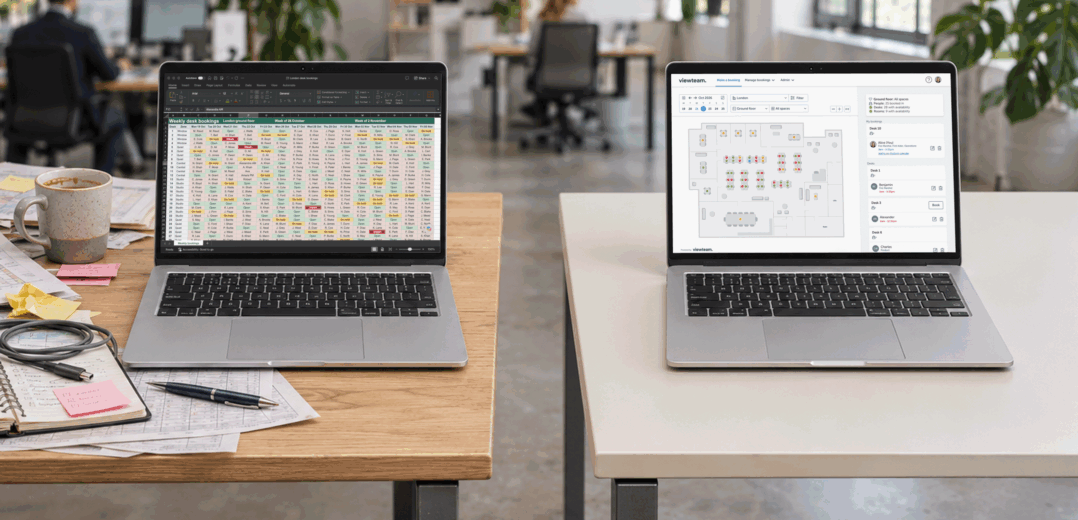
Using Excel to manage desk bookings can seem like the easiest option. Everyone knows how to use it, and when there are only a few people bUsing Excel to manage desk bookings can seem like the easiest option. Everyone knows how to use it, and when there are only a few people booking desks, it can work well.
But when office days change, desks are shared and colleagues need to sit together, the spreadsheet can quickly become another job to keep on top of. You might find yourself checking who has booked what, sorting out clashes or answering the same questions about which desks are free.
If that sounds familiar, desk booking software could make everyday office planning much simpler.
What changes when you use dedicated desk booking software?
Moving away from Excel should make life easier, not add another task to the list. With dedicated desk booking software, office managers can organise desks, set aside spaces for particular teams and manage bookings without constantly updating a spreadsheet. They can also set booking rules to match hybrid working policies.
Employees can easily see which desks are available, book a space or change their plans, with availability updating automatically. No more checking different versions of a spreadsheet or asking around to find out what’s free.
For office managers, that means fewer booking questions and a clearer picture of how busy the office is likely to be. For employees, it means less fuss when planning a day with colleagues.

How Viewteam makes every day booking easier
Viewteam brings desk, meeting room and parking bookings together in one place, helping office managers spend less time on admin and making it easier for employees to plan their office days.
- Find the right desk – Employees can see available desks on an interactive floor plan, check facilities and choose a space that suits their needs.
- See who’s coming in – Colleagues can see who’s planning to be in the office and book a desk nearby, making it easier to work together.
- Avoid double bookings – Availability updates automatically when bookings are made or cancelled. Optional check-in and automatic desk release also help prevent unused spaces from sitting empty.
- Make space for different teams – Manage shared desks, permanently assigned spaces and team areas, with booking rules to suit how your office works.
- Book through Microsoft Teams or a web browser – Employees can book desks, meeting rooms and parking without needing to open a spreadsheet or contact the office manager.
- See how your office is being used – Reporting helps office managers spot busy days, understand booking patterns and make better use of available space.
Is Excel ever enough?
For smaller offices where everyone has a fixed desk and plans rarely change, a spreadsheet may still do the job. There is no need to introduce a new system simply for the sake of it.
But if your team shares desks, works across different days or regularly spends time resolving booking issues, it is worth considering whether the spreadsheet is creating more work than it saves.
Your questions answered
Is switching from Excel to desk booking software complicated?
No, switching is simple and straightforward. Viewteam is intuitive and easy to use, so your team can start booking desks with minimal guidance. We also offer personalised demos and support every step of the way to help you get up and running.
Is desk booking software expensive?
Not necessarily. Excel may seem cheaper, but the time spent managing bookings also has a cost. Viewteam offers straightforward pricing with no hidden charges or admin fees, plus a 30-day free trial.
What if we don’t have an office floor plan?
Viewteam includes a floor plan creator, so you can build your own office layout from scratch without measurements or specialist training.
What is the main advantage of desk booking software over Excel?
Desk booking software lets employees see availability and book or cancel a desk directly, without manually updating a spreadsheet. Interactive office layouts show workspace amenities and where colleagues plan to sit, making it easy to find a desk near your team and book in as little as two clicks.
How does desk booking software prevent double bookings?
A purpose-built booking system updates availability as reservations are made, so the same desk cannot be booked by two people for the same time slot.
Does Viewteam work with Microsoft Teams?
Yes. Employees can book desks, meeting rooms and parking through a Viewteam app in Microsoft Teams.
Can Viewteam manage meeting rooms and parking too?
Yes. Viewteam supports desk, meeting room and parking space booking from one platform, alongside other configurable workplace resources.
Can we keep some permanently assigned desks?
Yes. Viewteam supports a mix of permanently assigned and flexible spaces, as well as team zones and booking restrictions.
How can we tell whether our office space is being used effectively?
Viewteam’s built-in analytics let you review booking patterns, check-ins and office utilisation. See which days are busiest and which spaces are underused to make better use of your office.
Ready to retire the desk booking spreadsheet?
If your current process is becoming harder to manage, take a look at Viewteam. See how your team could book desks, rooms and parking, and decide whether it is a better fit for your workplace. Book a personalised demo or start a 30-day free trial, with no credit card required.